
Imagine your mobile app as a bustling city. Users navigate through different screens, interact with features, and make choices – all valuable data that can inform your marketing strategy. But how do you capture this data effectively without getting bogged down in complex code changes? Enter Google Tag Manager (GTM) for mobile apps – your secret weapon for streamlined tracking and insightful marketing decisions. This dives deep into Google Tag Manager for mobile apps, explaining its benefits, implementation process, and how it empowers you to understand your app’s user behavior better.
What is Google Tag Manager for Mobile Apps?
Google Tag Manager (GTM) is a central hub for managing all your mobile app’s tracking tags. These tags are little pieces of code that gather and transfer data to different marketing and analytics systems, such as Facebook Ads, Google Analytics, and Firebase. Traditionally, adding or modifying these tags required code changes within your app, which could slow development cycles and necessitate app store resubmissions.
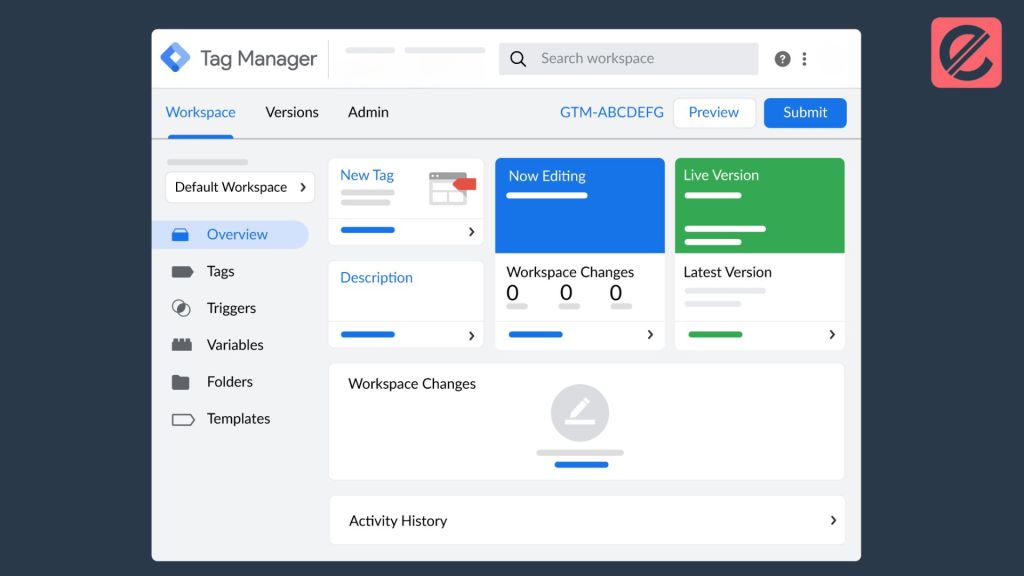
GTM for mobile apps eliminates this hassle. It provides a user-friendly interface for adding, configuring, and deploying tags without touching your app’s code. This translates to greater agility, allowing you to make real-time adjustments to your tracking strategy based on your marketing needs.
Why Use Google Tag Manager for Mobile Apps?
There are several compelling reasons to embrace Google Tag Manager for your mobile app:
- Simplified Tag Management: GTM is a single control point for all your tags. The intuitive GTM interface allows you to add new tags, modify current ones, and disable them. This eliminates the need to involve developers for every minor tag modification, streamlining the process significantly.
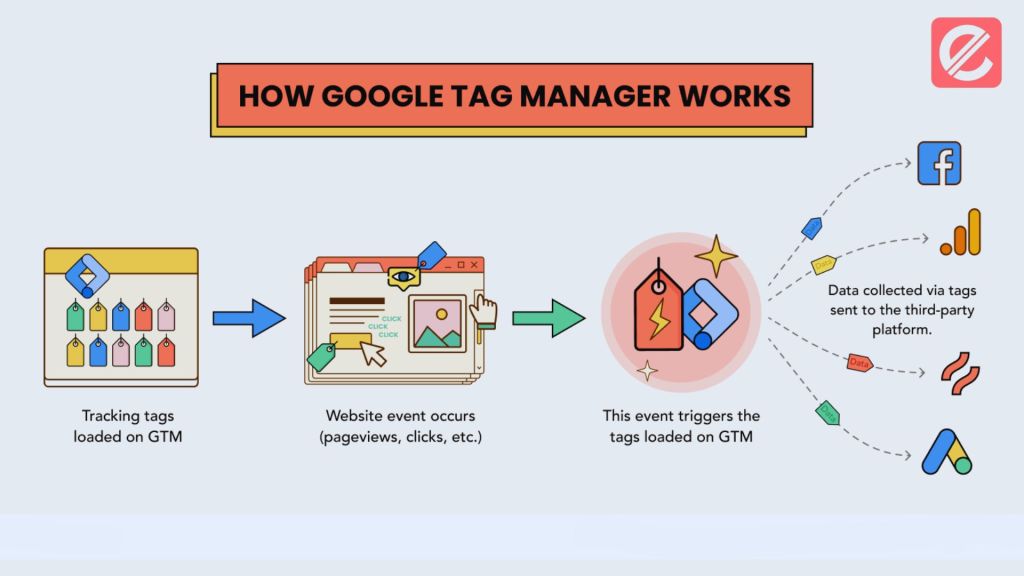
- Increased Agility: GTM empowers you to make swift changes to your tracking strategy without app store resubmissions. Need to add a new conversion tracking tag for a particular marketing campaign? No problem! With GTM, you can deploy the tag within minutes, ensuring you capture valuable data.
- Improved Data Accuracy: GTM provides robust error-checking and debugging functionalities. This minimizes the chances of mistakes getting introduced during manual tag implementation, leading to more reliable and trustworthy data for your marketing decisions.
- Enhanced Collaboration: GTM fosters better collaboration between marketing and development teams. Marketers can independently manage tags without relying on developers, while developers can focus on core app functionalities.
- Richer Analytics: GTM seamlessly integrates with various analytics and marketing platforms. This allows you to collect a broader range of data points, painting a more comprehensive picture of user behavior within your app.
How to Implement Google Tag Manager for Mobile Apps
Integrating GTM into your mobile app involves a few key steps:
- Set Up Your GTM Account: If you don’t already have one, create a Google Tag Manager account. This account will be your main center for managing tags across your websites and mobile apps.
- Create a Mobile App Container: Within your GTM account, you must create a dedicated container for your mobile app. This container will house all the tags associated with your app.
- Install the GTM SDK: The next step involves installing the Firebase SDK (which includes the GTM SDK) into your app’s codebase. This SDK facilitates communication between your app and the GTM container.
- Configure Tags and Triggers: GTM’s user interface allows you to configure various tags for different analytics and marketing platforms. You can also define triggers that determine when these tags fire and send data. For instance, you might create a trigger that fires when a user completes a purchase within your app.
- Preview and Publish: Once you’ve configured your tags and triggers, testing them thoroughly using GTM’s preview and debug mode is crucial. This ensures all tags function correctly before publishing the container to your live app.
Unleashing the Power of GTM for Mobile Apps
With GTM in place, you can unlock a treasure trove of benefits for your mobile app marketing strategy:
- Track User Engagement: Gain insights into how users navigate your app, which features they interact with most, and where they drop off. This data can inform app improvements and optimize the user experience.
- Measure Campaign Performance: Effectively track the success of your marketing campaigns by monitoring key metrics like app installs, in-app purchases, and user engagement. This allows you to identify what’s working and adjust your campaigns accordingly.
- Optimize Revenue Generation: Gain a deeper understanding of your app’s monetization strategy by tracking in-app purchases, subscriptions, and other revenue streams. This data can help you identify areas for improvement and maximize your app’s revenue potential.
Advanced Techniques with Google Tag Manager for Mobile Apps
While the core functionalities of GTM are straightforward, it offers a wealth of advanced features for power users:
- Custom Variables and Data Layers: GTM allows you to create custom variables that capture specific data points within your app. You can then leverage these variables within your tags to send more granular data to analytics platforms. Additionally, data layers provide a structured way to pass data from your app to GTM, further enhancing the flexibility and richness of your data collection.
- Custom Triggers and Event Tracking: GTM goes beyond pre-built triggers. You can create custom triggers based on your app’s user actions or events. This empowers you to track particular user behaviors and gain deeper insights.
- Container Versions and Version Control: GTM employs a version control system, allowing you to create different versions of your container and test them before publishing them to your live app. This ensures you can make changes and experiment with varying tracking configurations without impacting your app’s functionality.
- Container Workspaces and User Management: GTM offers workspaces and user management features for larger teams. This enables you to set up distinct workspaces for testing and development and provide individuals with varying access levels according to their jobs.

Streamline Your Mobile App Tracking with GTM
Google Tag Manager revolutionizes mobile app tracking by offering a centralized, code-free approach. It empowers marketers to take control of their tracking strategy, make real-time adjustments, and comprehensively understand user behavior within their app. GTM provides you with the resources you need to maximize your marketing efforts and propel the success of your mobile app, from advanced features like custom variables and triggers to simplified tag administration.
Ready to unlock the power of Google Tag Manager for your mobile apps? Explore Elatre expertise in mobile app marketing and tag management. Our team of specialists can help you implement GTM effectively, configure custom tracking solutions, and leverage data insights to optimize your app’s performance. Contact Elatre today and take your mobile app marketing to the next level!