Have you ever encountered an error message while browsing the web? Perhaps you saw a “404 Not Found” or a “500 Internal Server Error.” These cryptic messages, known as HTTP response codes, are the web language silently conveying information between servers and browsers. As a web developer, you can detect problems, maximize efficiency, and design an ideal user experience by being aware of these codes.
What are HTTP Response Codes?
HTTP Response Codes are three-digit numerical messages a web server sends in response to a client’s (usually a browser’s) request. These codes provide a standardized way to communicate the outcome of the request. Like traffic signals on the road, HTTP response codes guide browsers on how to proceed.
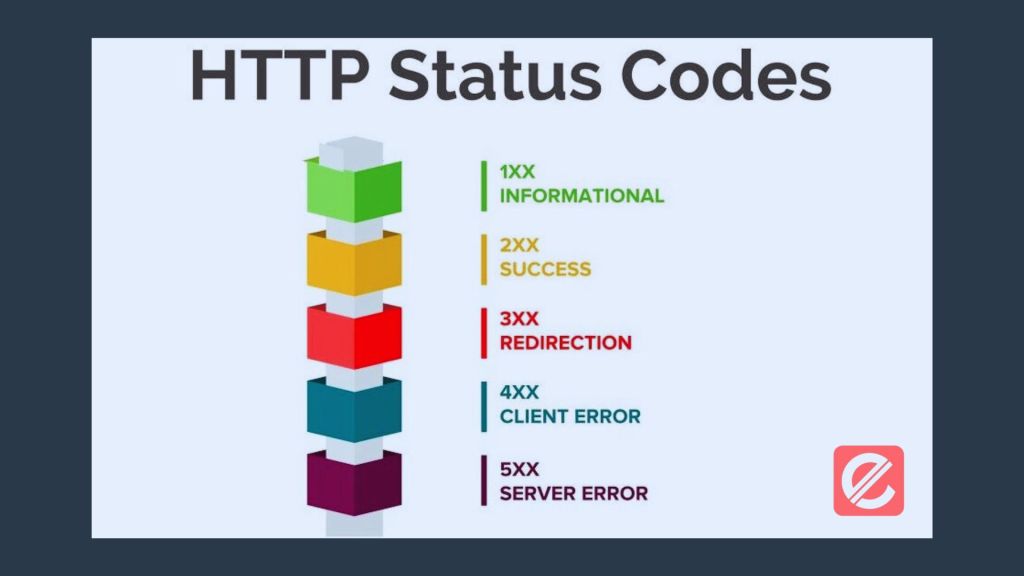
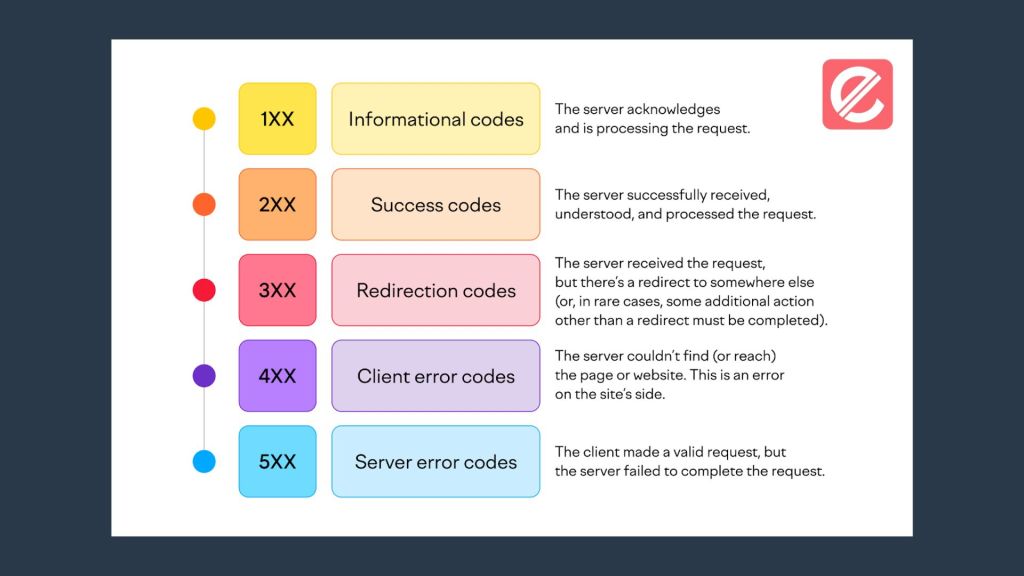
There are five main categories of HTTP response codes:
- Informational (1xx): These codes indicate provisional information about a request, like a server acknowledging receipt and continuing to process it.
- Successful (2xx): These codes signal that the request was understood and processed. The most common success code is 200 OK, which means the request was completed, and the requested data is in the response.
- Redirection (3xx): These codes tell the client to redirect its request to a different location. For example, the requested resource has been permanently moved to a new URL, as shown by a 301 Moved Permanently code.
- Client Error (4xx): These numbers indicate a client-side error, which occurs when the browser sends a request the server cannot process. A typical example is a 404 Not Found code, which indicates the requested resource could not be located on the server.
- Server Error (5xx): These codes signal errors originating from the server’s side, preventing it from fulfilling the request. A standard error is a 500 Internal Server Error, which means an unexpected condition arose on the server.
Understanding Common HTTP Response Codes
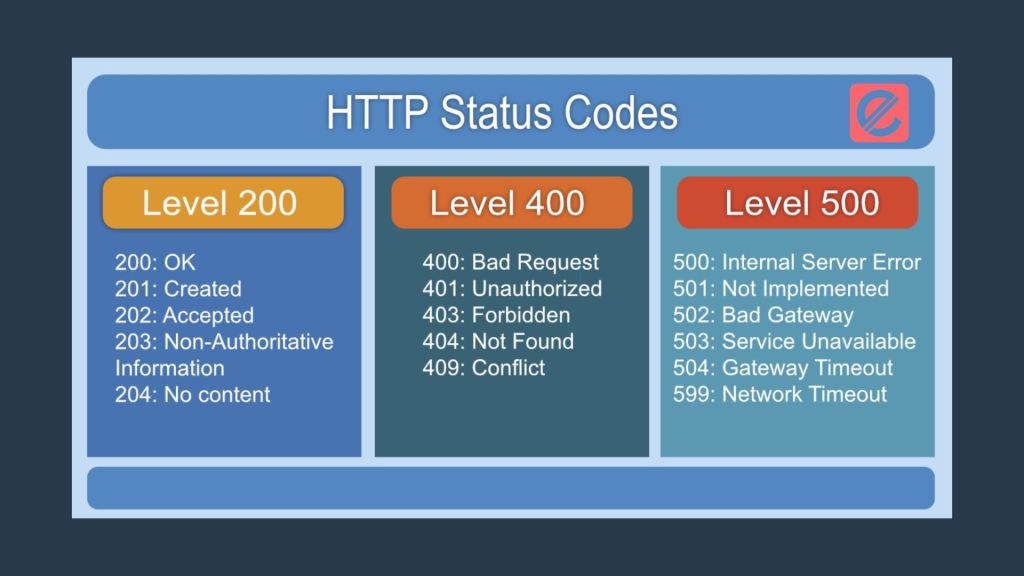
Let’s delve into some of the most frequently encountered HTTP response codes:
Successful Codes (2xx)
- 200 OK: This is the golden ticket! It signifies that the request was successful, and the requested data is in the response.
- 204 No Content: Despite the successful request, the server has no content to return. (often used for DELETE requests).
Redirection Codes (3xx)
- 301 Moved Permanently: This code denotes a permanent relocation of the requested resource to a new location. The revised URL will be included in the response.
- 302 Found: The temporary replacement URL provided in the response contains the requested resource.
Client Error Codes (4xx)
- 404 Not Found: The browser couldn’t locate the requested resource on the server. This is often due to a typo in the URL or a deleted resource.
- 400 Bad Request: The request contained inaccurate or missing information, which prevented the server from understanding it.
- 401 Unauthorized: To access the specified resource, authentication is necessary.
Server Error Codes (5xx)
- 500 Internal Server Error: An unexpected condition prevented the server from fulfilling the request.
- 503 Service Unavailable: Overload or maintenance has rendered the server unavailable.
Benefits of Understanding HTTP Response Codes
By understanding HTTP response codes, you gain several advantages:
- Efficient Debugging: Response codes pinpoint the source of errors, streamlining the debugging process. Imagine a mechanic who can diagnose a car problem just by listening to the engine. Similarly, understanding response codes allows you to fix website issues swiftly.
- Enhanced User Experience: By promptly addressing client-side errors (4xx) and server-side errors (5xx), you can prevent frustrating encounters for your users. A smooth user experience is paramount for building trust and loyalty.
- SEO Optimization: Search engines consider website performance when ranking pages. By resolving errors that lead to slow loading times (like 500 errors) and implementing proper redirects (3xx codes), you can improve your website’s SEO ranking.
Tools and Resources for Exploring HTTP Response Codes
There are several valuable tools and resources at your disposal to aid you in learning and working with HTTP response codes:
- Browser Developer Tools: Developer tools are included in most contemporary web browsers. With these tools, you can examine network requests and responses and the associated HTTP status codes. This is a fantastic way to explore codes in real time as you browse websites.
- Online HTTP Status Code Checkers: Numerous online tools can analyze a URL and return the corresponding HTTP response code. These tools help troubleshoot specific website issues.
- HTTP Reference Resources: Several comprehensive online resources explain each HTTP response code and its implications. These websites are an invaluable source of reference when dealing with codes that are foreign to you.
Mastering HTTP response codes empowers you to become a more proficient web developer. These simple codes provide a wealth of information, enabling you to diagnose issues, optimize website performance, and create a seamless user experience. If you’d like to delve deeper into web development and explore advanced SEO optimization techniques, Elatre can be your guide. Our team of creative digital marketing experts can help you craft a winning online presence.
Ready to unlock your website’s full potential? Elatre’s team of digital marketing specialists is here to help. We provide a full range of services, such as content marketing, site construction, and SEO optimization. Contact Elatre today, and let’s craft a winning online strategy together!