
Imagine venturing into a library, but instead of neatly organized shelves, you’re faced with a mountain of books piled high, reaching the ceiling. Sifting through this disorganized mess to find that specific novel you seek would be daunting, wouldn’t it? This is what users experience when encountering a website with excessively long lists. Thankfully, there’s a solution as elegant as a well-organized library: pagination. We’ll explore pagination, its benefits, implementation methods, and SEO advantages. By the end, you’ll be equipped to transform your website’s long lists into user-friendly, SEO-optimized pages.
Pagination: A User-Friendly Approach to Long Website Content
Pagination breaks down lengthy content sets into manageable chunks, like organizing library books onto shelves. This creates a more pleasant browsing experience for your visitors. Let’s explore why pagination is crucial for your website.
Why Use Pagination? The Benefits of a Well-Paginated Website
There are numerous advantages to implementing pagination on your website. Here are some key benefits:
- Enhanced User Experience: Endless scrolling can be overwhelming and lead to user frustration. Pagination breaks down content into digestible pieces, making it easier for users to navigate and find what they want.
- Improved Website Performance: Large lists can significantly slow your website’s loading speed. Pagination reduces the amount of data loaded on a single page, resulting in a faster and more responsive browsing experience.
- Increased Engagement: When given digestible content pieces, users are more likely to continue exploring. Pagination encourages more profound engagement with your website’s content.
- SEO Advantages: Search engines prioritize user experience. A well-paginated website with faster loading speeds and clear navigation signals positively impacts SEO.
How to Implement Pagination on Your Website: A Step-by-Step Guide
Now that we understand pagination’s benefits let’s explore how to implement it on your website. The specific approach will vary according to your website’s technology stack, but generally speaking:
- Define Your Page Size: Determine the ideal number of items you want to display on each paginated page. A typical range of 10-20 items per page can be adjusted based on your content type and audience preferences.

- Server-Side or Client-Side Pagination: Choose between server-side or client-side pagination. Server-side pagination retrieves data from your database for each page request, offering better SEO control. Client-side pagination uses JavaScript to load additional content dynamically, potentially impacting SEO.
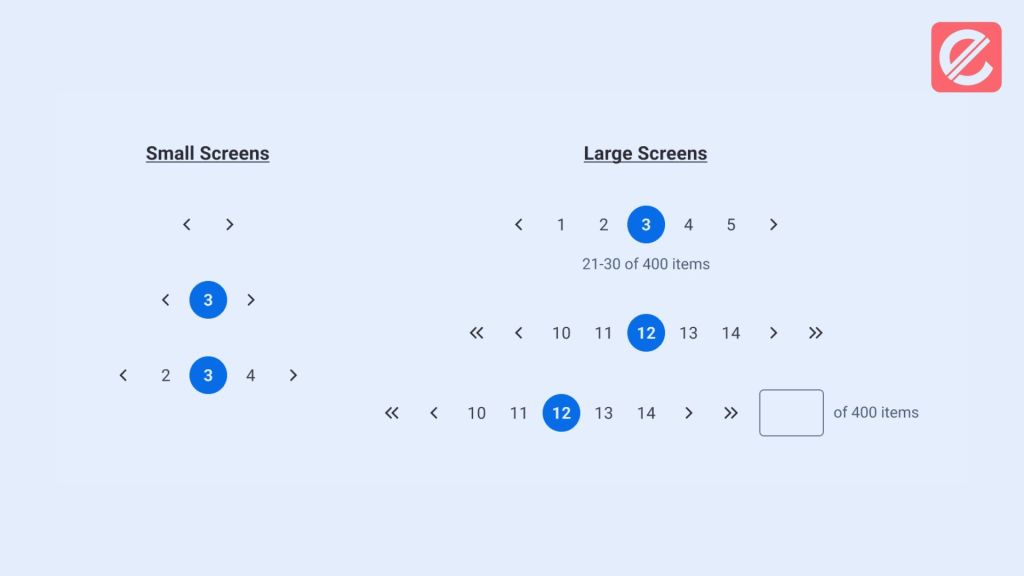
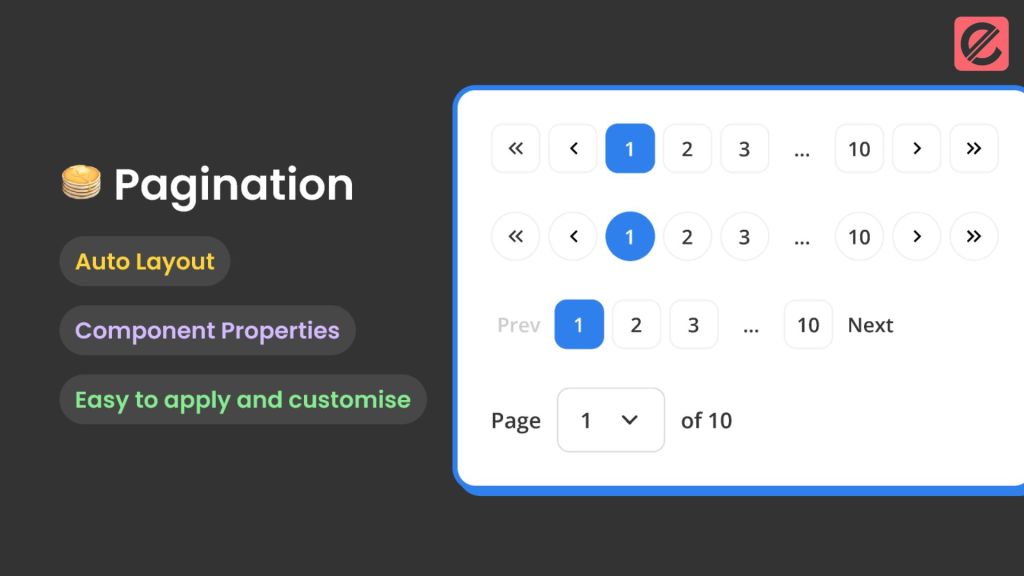
- Design User-Friendly Navigation: Create clear and intuitive navigation elements for users to move between pages. This typically includes buttons or links labeled “Previous,” “Next,” and potentially page numbers.
- Consider Additional Features: While primary navigation is essential, you can enhance the pagination experience by including features like “Go to First Page” or “Go to Last Page” buttons or displaying the current page number and total number of pages.
Technical Considerations for Pagination
Here are some additional technical considerations for pagination:
- URL Structure: Maintain a consistent URL structure for your paginated pages. This guarantees accurate indexing and aids search engines in comprehending the relationships between pages.
- Canonical Tags: Use canonical tags to specify your content’s original, non-paginated version. This helps avoid duplicate content issues and optimizes SEO.
- Accessibility: Ensure your pagination controls are accessible to users with disabilities. This includes using proper HTML semantics and keyboard navigation support.
Pagination and SEO: A Winning Combination
Pagination not only improves user experience but also offers SEO benefits. Here’s how:
- Improved Crawl Efficiency: When your content is divided into smaller, well-structured pages, search engine crawlers can discover and index it more efficiently.
- Reduced Bounce Rate: Pagination is a great way to keep visitors engaged with smaller bits of content, lowering your bounce rate. A lower bounce rate is a good indicator for SEO.
- Targeted Keywords: Each paginated page can be optimized for specific keywords, allowing you to target a broader range of search terms.
Choosing the Right Pagination Method: Server-Side vs. Client-Side
In the previous section, we briefly touched upon server-side and client-side pagination. Let’s delve deeper into these two methods to help you choose the most suitable option for your website:
Server-Side Pagination
- Benefits:
- Better SEO control: Search engines can easily index each paginated page as a separate URL.
- Improved security: Sensitive data retrieval happens on the server side, minimizing client-side vulnerabilities.
- Potential performance benefits for large datasets: Server-side processing can efficiently handle complex data filtering and sorting.
- Drawbacks:
- Increased server load: Each page request requires server-side data retrieval, potentially impacting performance on high-traffic websites.
- Depending on your website’s technology stack, it may require more complex development.
Client-Side Pagination
- Benefits:
- Faster initial page load: Only the first data page is loaded initially, improving perceived performance.
- Potentially smoother user experience: Content updates dynamically without full page reloads.
- It may require less initial development effort.
- Drawbacks:
- SEO considerations: Search engines only index some paginated pages effectively.
- Potential accessibility issues for users with JavaScript disabled.
- It may not be suitable for large datasets or complex filtering/sorting functionalities.
Choosing the correct method depends on your website’s specific needs and priorities. Server-side pagination is generally recommended for optimal SEO and security, while client-side pagination might be suitable for more straightforward websites prioritizing initial page load speed.
Transform Your Long Lists into User-Friendly Pages with Pagination
By implementing pagination, you can transform your website from an overwhelming jungle of information into a well-organized library. This user-friendly approach enhances the browsing experience and offers significant SEO advantages.
Understanding Different Pagination Styles for Your Website
Pagination is a crucial element of web design, offering various styles to enhance user experience. Choosing the right style depends on your website’s content and audience.
- Numeric Pagination: Page numbers are displayed in this format at the bottom of each page, enabling users to navigate directly to any page. It is ideal for content-heavy sites like blogs or e-commerce platforms.
- Infinite Scroll: Content loads continuously as the user scrolls down the page. This style is famous for social media sites and news feeds but can be challenging for SEO.
- Load More Button: A hybrid between infinite scroll and numeric pagination, this style loads additional content when the user clicks a button. It balances user control with a seamless browsing experience.
- Alphabetical Pagination: Useful for directories or glossaries, this style allows users to jump to content based on the alphabet.
- Chronological Pagination: Ideal for blogs and news sites, this style sorts content by date, helping users navigate through older or newer posts easily.
Best Practices for Pagination Design and Usability
Effective pagination enhances user experience and accessibility, guiding visitors through your content effortlessly. Implementing best practices ensures a seamless navigation experience.
- Consistent Design: Maintain a uniform design for pagination elements across all pages. Consistency helps users understand and interact with the pagination easily.
- Visible Navigation: Ensure pagination controls are visible. Use contrasting colors and appropriate font sizes to make them stand out.
- Feedback Mechanism: Provide visual feedback when users interact with pagination controls. Highlight the current page and show loading indicators.
- Accessibility: Implement keyboard navigation and screen reader compatibility to make pagination accessible for all users.
- Page Limits: Avoid overwhelming users with too many pages. Use appropriate content limits per page to balance load times and usability.
- SEO Considerations: Use proper HTML markup and include rel= “next” and rel= “prev” attributes to enhance search engine understanding of paginated content.
Common Mistakes to Avoid When Implementing Pagination

Implementing pagination may seem straightforward, but certain pitfalls can negatively impact user experience and SEO. Avoiding these common mistakes ensures effective pagination.
- Hidden Controls: Never hide pagination controls or make them difficult to find. Users should quickly locate navigation elements.
- Inconsistent Positioning: Keep pagination controls in a consistent location on each page, preferably at the bottom or top, to avoid confusion.
- Ignoring Mobile Users: Ensure pagination is responsive and user-friendly on mobile devices. Large touch targets and simplified controls are essential.
- Poor Loading Performance: Optimize your site to prevent slow loading times when users navigate through pages.
- Ignoring Analytics: Track pagination usage with analytics tools to understand user behavior and improve navigation.
- Lack of Visual Feedback: Users should receive immediate feedback when interacting with pagination controls to confirm their actions.
Enhancing User Experience Through Effective Pagination
Effective pagination significantly enhances user experience, making content navigation smooth and intuitive. By following these strategies, you can optimize pagination for your visitors.
- Clear Indicators: Use clear and intuitive indicators to show the current page, total pages, and navigation options.
- Logical Order: Arrange pages in a logical order that matches user expectations. For example, use chronological order for blogs and numerical order for product listings.
- Descriptive Labels: To aid navigation, use descriptive labels for pagination controls, such as “Next,” “Previous,” or specific page numbers.
- Load Speed: Ensure quick load times for paginated content to keep users engaged and reduce bounce rates.
- Interactive Elements: Implement interactive elements, such as hover effects or animations, to enhance the visual appeal of pagination controls.
- Feedback and Confirmation: Provide feedback when users interact with pagination controls, such as highlighting the selected page or displaying a loading spinner.
Pagination for Mobile Users: Tips and Tricks
Making sure pagination is optimized for mobile users is crucial, given the rise in the use of mobile devices. These tips and tricks will help optimize pagination for a mobile-friendly experience.
- Responsive Design: Design pagination controls that adapt seamlessly to different screen sizes. Use flexible layouts and touch-friendly elements.
- Large Touch Targets: Ensure pagination buttons are large enough to tap on small screens easily. Avoid placing buttons too close together.
- Simplified Controls: Simplify pagination controls for mobile users by reducing the number of visible options. Use a combination of numeric and “Load More” buttons.
- Sticky Navigation: Implement sticky pagination controls that remain visible as users scroll through content. This improves accessibility and ease of use.
- Minimalist Approach: Use a minimalist design for pagination to reduce clutter and enhance readability on small screens.
- Testing and Optimization: Continuously test and optimize pagination for mobile devices. Analyze user behavior using analytics to identify trends and make required corrections.
Are you Ready to explore how Elatre can help you implement effective pagination strategies and optimize your website for search engines? Elatre is a creative digital marketing agency crafting user-centric experiences that drive results. With the help of our expert team, you can develop a comprehensive pagination strategy that prioritizes search engine optimization and user experience.
FAQ
1. Does pagination improve SEO?
According to Google, pagination can help you improve page performance (which is a Google Search ranking signal). And here’s why. Paginated pages load faster than all results at once. Plus, you improve backend performance by reducing the volume of content retrieved from databases.